Enter your keyword

Communications Design Industry Discussion, Inspiration, & Tutorials

Apr 27, 2015

It’s Time Again: Summer Intern Search

By On 09:07
Last year I was relatively tight-lipped about the intern search process when writing for this blog. There are a few reasons why I chose to keep my lip zipped and pen still. In spite of the thorough search that I usually employ when seeking out interns, I was given some unsolicited help from one of the veeps in my organization. This thoughtful individual found two students who had enough creative experience to be called novices, no design portfolios—and not enough pieces to club together a single portfolio between them, and they hadn’t even seen the position description posted online or in print. However, these two students were her choice.

In the question of their employment, I had no choice.

For my part, I had a few quite good design students in my Digital Publishing class last spring, and one who was exceptional. This young woman was creative, a decent writer, paid meticulous attention to detail, and was a fearless self-starter; taking the initiative to learn tools and concepts that went far beyond my course curriculum. When I approached this student, I gave her the option to apply as my summer intern—without a guaranteed post. That was completely false on my part—there was no way that this much talent would slip through my fingers.

So my dilemma last June was, what to do with so many interns.

The student that I vetted was sleighed to learn Adobe DPS, and build an entire section of our organization’s newest mobile app, while also learning to storyboard, record convincing voiceover, and edit video, and design digital signage for upcoming campus-wide events. I was informed that the others would also assist with video and graphic design projects. Early on I was mostly mad and seriously skeptical, but as the summer unfolded I became slightly less skeptical.

After all, we had unlimited access to Lynda.com, and neophytes should have been able to learn the principles of graphic design, plus complex software in a semester, right? Right. Lynda was actually one tool that I employed to help my surplus assistants get up to speed.

As each intern started their tenure with me I gave them a list of projects for the semester, this also included links to the corresponding video tutorial(s) to help them get up and running with each project. I felt like a genius. Instead of using valuable time to give hand-holding instruction, I let each individual work at their own pace. Of course, there were daily check-ins, and I treated my students to at least one lunch date where we talked about progress, challenges, and opportunities in their projects. My goal was to treat my summer interns as colleagues, rather than students. It was a mostly successful tactic.


Where did I fail, you wonder?


One of the interns that I was given—it turns out—had problems working autonomously. While he was a good student and eager to learn about video production and editing, he lacked the self-motivation to learn and effectively solve problems on his own. This information I learned after an encounter with his video production professor. In addition to his chuckle of surprise that I chose that particular student to assist with such an advanced series of projects, he gave me some insight. The phrase used was “you gotta keep on top of him.”

My reply to that bit of news was that I’m not a mountain goat (mine is a quick wit).

At the end of the summer season, I’d gotten a chance to work with three interesting young people who knew more than they did at the start of the summer. And I had a diplomatically worded conversation with my boss’ boss’ boss about my internship interview process and its importance to the quality—and quantity—of completed design collaterals.

Apr 20, 2015

stocky

By On 08:12
image


Apr 9, 2015

Ten Commandments of Typography

By On 07:43
This infographic was shared via the UB Design Group, LinkedIn Group. It offers some great pointers for student and reinforces our in-class lecture, Introduction to Typography. If my students forget everything I said in class, this is a handy-dandy cheat sheet--without enduring my sarcastic commentary on use of comic sans, papyrus, bleeding cowboys (yes, I used to totally love this typeface, but it's been linked to some seriously bad design in the past 5 years)


Explore more visuals like this one on the web’s largest information design community – Visually.

Mar 15, 2015

Tailored Resume - Whys and Wherefores

By On 06:26
Maybe you’ve heard that a tailored resume is one of the best ways to grab a hiring manager’s attention. It’s a fact that a one-size-fits-all, generic, general resume doesn’t cut it—remember, you’re facing a pool of hundreds (and potentially thousands) of competing applicants.

What Makes a Resume “tailored”?


Hiring managers are looking for the best fit for the needs of the job, team, and organization as a whole. Here are some core aspects that a tailored resume addresses. The list below will help you identify the information you’ll need to craft yours:

Responsibilities that match the job description - A good place to start is to demonstrate that you’ve already done the type of work the organization needs. Read through the full job description and pay careful attention to what the position entails. Include on your resume any of your work experience that most closely relates to those responsibilities.

Avoid wasting time and space with details that don’t relate to the job or the work of the organization—this means that yes, you can delete some items from your exhaustive list of duties. If you’re dying to mention them in your application, then craft a well-worded paragraph in the cover letter that outlines the important items that you’ve deleted.

Why? If you already have competency in those areas, you’ll be a quick study and able to hit the ground running in your new job.

How It’s Done / Example

Job description states: Serve as a significant role model for effective and appropriate work behaviors, procedures, and practices. Act as a liaison and advocate for participants.

On your resume, perhaps:
Advocated on behalf of approximately 960 students and 23 student groups as their primary representative to the faculty and administration.


Mar 6, 2015

Teaching Update…a Thank-You Note

By On 08:07

Last spring I tried out the flipped classroom approach to teaching, and got a slew of mixed reviews from my students. The first half of session was administered as a traditional undergrad class, then I moved to a flipped model after spring break. One of my students called me crazy--and she was right.

This season has been much better. With this model, it's obvious when students skip the textbook/video elements when we work in class, and I have time to really take notice. The real bonus is that I get to give everyone individual time without holding back the more advanced designers or rushing the novices.

Last week, as I walked around the room answering questions, giving notes, feedback and pointers, I paused to tell one on my more advanced students about her design (above). She was  appreciative of my notes but uncharacteristically monosyllabic. Then I got this email:

Hi Prof Christian-
I just wanted to thank you for being really nice to me today and for giving me a lot of positive feedback. It's incredibly refreshing to have a professor that shows that he/she really cares about students, and also to hear kind words about my work when I feel like my life is completely and utterly imploding….

...I just wanted to say thanks for making me feel welcome in your class.
This is just an excerpt. In reading the full message I got a teary eyed--because this exceptionally talented student outlined her fears and anxieties about not measuring up at what is, apparently, an extremely personally stressful time.

I remembered that in my last semester of grad school was one of emotional strain and upheaval (at one point I lost 10 lbs in 2 days-no exaggeration) and one of my profs, Amy Pointer, paused to talk about a portfolio piece that had me stressed. Her concern and positive feedback gave me the little push I needed to keep going--and stay sane long enough to graduate.

Mar 1, 2015

The Pen Tool is too Hard....

By On 07:37
Yes it is, but this is one of the most useful tools in the Adobe Suite–when it comes to control, creating custom clipping masks and shapes.

In working out a way to introduce my students to the highly intimidating bezier tool, I stumbled across this awesome interactive, real-time game. It gives you animated tool tips coupled with instant gratification.

Practice makes perfect. Check out the Bezier Game to get some practice:


http://bezier.method.ac
the Bezier game website

Feb 11, 2015

(another) Teaching Update...

By On 07:33
This semester my students have a wide array of talents and interests to bring to the classroom. When reviewing the results of my Google Drive Form /survey I learned that about a third of students are juniors or seniors, and many have experience with Adobe Design suite, a few more have already worked with non-linear, time-based media and motion graphics. Walking into the class, I jokingly commented that they could probably teach me a thing or two.

Anyway, one student with a stronger design background (but little based in Photoshop) submitted her first project, the narrative graphic collage. The first design, below is quite good for Photoshop newbie--her attention to detail is evidenced by the careful cutout/isolation of the air balloons that were taken from multiple sources). But then she took my minimalist design notes and created an improved final version


(I’ll chalk that up to excellent teaching and critique):
Version one uses the image elements, color balance, and
even the text to create a feeling of movement.

Updated version moves the text to a more traditional location with a
more traditional baseline. Too many indicators or movement are overkill.

Dec 28, 2014

Teaching Update: Spring 2015

By On 08:05
I’m back in the classroom in January, teaching Digital Imaging at my alma mater. I look forward to a new group of students with different skills and ability levels. Most of all I look forward to applying the flipped class model to working with Photoshop and Adobe Illustrator (my A-number-one-most-favoritest-golly-gee-I-do-love-it, design software)!

Last spring I got a chance to try it out when teaching InDesign and web design, and students were really receptive to that teaching style, even if they were a bit surprised by it. This season, I’ve already compiled a series of video resources—thanks to Youtube and Camtasia—and have put together our class blog with pre-scheduled articles. One thing that I’m adding to the mix is the class discussion forum—instead of using a Wordpress blog for peer feedback. It struck me that the pressure of writing in a public forum might be a little intimidating to some students. Hence the forum that’s in our LMS. I’m so jazzed.

Oh, right, what’s a flipped classroom, you ask? This:

Dec 12, 2014

Creative Commons Photo Round Up.....

By On 07:21
Note: Not all images shared from these sites are necessarily free-to-use. Be sure to review the license details before using any image that isn’t yours in your collage:
  • Flickr: Must check search options boxes for “Find Content to Modify, Adapt, and Build Upon”
  • Wikimedia Commons: Thousands of worldwide images licensed under Creative Commons.
  • stock.xchng: More than 350,000 free photo images, searchable.
  • dreamstime: Free section of a very large photo images archive. Excellent quality images.
  • morgueFile: More than 200,000 free photo images, searchable in several ways, including by color and topic.
  • WorldImages: About 75,000 international images, well-organized by content areas and searchable.
  • U.S. Government Images: Photos produced by U.S. Government employees are copyright-free. This site has a selection of links to different government agencies’ collections.
Stock Images can be expensive, those of us in the non-profit sector, education, and rapidly-shrinking in house design departments are well aware.  Here are some sites that can give you the free images that you need to really make your designs pop!
Public Domain images and materials are ‘publicly available’ and not covered by intellectual property or copyrights. Today, graphic a design and digital media is abundant, so there is a high demand for images for use in print, web, and multimedia.
Here are are four public domain sites to pin and save. Enjoy:
http://publicdomainpictures.net
http://commons.wikimedia.org/wiki/Main_Page
http://photos-public-domain.com
http://www.sxc.hu

This week: Branding Instructional Innovation

By On 06:32
It’s been busy around here! We had our final TechTalk PD session of the semester and I’m working on our 2-year strategic communications plan. That sentence is my inelegant segue…


Part of our strategic communications is a push to rebrand. I've been working on concise and informative mission and vision statements that define and support the branding. These statements are headed to the team for feedback and tweaking—if any.

Accompanying the text is a series of logo designs that I propose will represent our team of instructional technology experts. Click on the image to take a closer look:


Dec 1, 2014

This Week: Syllabus Solutions

By On 08:37
Course Design is graphic design, and graphic design is not strictly art. There are rules and guidelines that allow the novice or seasoned designer to create an effective page; course web page or commercial web page.

These principles of design include balance, proportion, rhythm, emphasis, and unity.

It means that the layout of the finished page has a harmonious mix of words and images that provides an easily deciphered page. If you want a primer on the principles of design take intro to graphic design or show up to day one of any class that I teach.

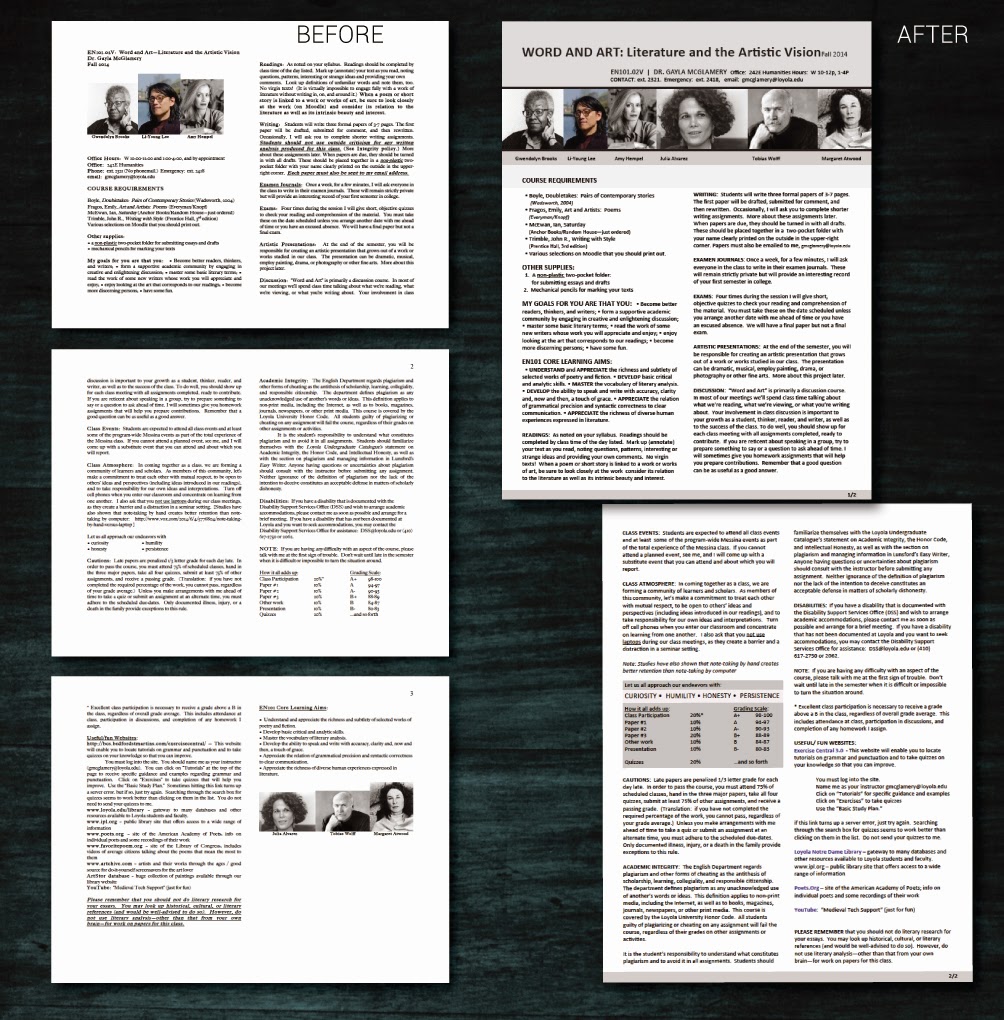
One of our English faculty emailed me with this problem ‘help, my students are having trouble understanding my syllabus.’ After reviewing the syllabus and course I saw the problem. Since this client wants a hand in the revamp of the course materials, I opted to roughly layout a few options (web and print)now and then meet with her after finals to refine.

Below are before an after. Think about how balance, proportion, rhythm, emphasis, and unity work together to make one option more effective than the other:

Notice in the update that the 2-column layout is maintained. However, weighty elements are at the top of the
opening page, and all images are now uniform. Although hard to distinguish, subheads have a regular format
and are rendered in all-caps, bold. Lastly, the grading criteria is placed in a callout box to draw the reader...
 

Nov 25, 2014

This Week: Editing Video(s)

By On 08:12
In the past half-year or so I’ve lamented the fact that I have little time to do in-depth video production. That drought is over.

With growth on the horizon for my department and an organizational push toward getting the most from the technology tools that we now employ, I’ve been called upon to interview some folks. I got the assignment and the deadline last week—these need to be done really soon. Luckily I grabbed my favorite campus personality about a year ago and recorded a 30-minute interview and B roll of him strolling across campus and teaching his online course.


This week is dedicated to editing down 2+ hours of interviews, and an hour of atmosphere/B-roll into three, under-five-minute snapshots of how our faculty use technology in the and out of the class. The upshot of this double-quick assignment is that I get to hear the individual stories of how these folk approach the tools. What I’ve learned—and this is important for us in IT departments to hear—is that they are open to using these tools and pushing the limits of the technology to best fit their needs. They’re experimental and they’re open.

My goal is to have my final cuts done by Friday.

Then sometime on Monday, next week, my committee reviews them for content and offers any edits or input. And I spend that afternoon editing--if necessary. Then the final cuts will be hosted on our website by next Tuesday…

*Whew*


Popular